Publish a Cursor canvas to your team wiki: dashboards that outlive the chat
· Sergii Kravtsov · Folio
You ask Cursor for a release dashboard and it builds a canvas: a live page with filters, charts and a checklist, open beside the chat. It is exactly what the team would like to open on Monday, and it sits in your editor, on your disk. Folio has a page kind for such pages, the artifact, so the canvas can become a page of the wiki.
This post comes from a real run. We wrote a small canvas, connected Cursor's agent to a Folio over MCP, asked it in one casual line to publish, and then opened the result in a browser and clicked everything. Below: what the agent did, what the page can and cannot do, and where the canvas and the page differ.
What a canvas is, and why it needs a home
A Cursor canvas is a single file, a React component, that the editor compiles and shows next to the chat. It is built from Cursor's own components (stacks, cards, tables, number tiles, bar, line and pie charts, form controls) and it keeps its small state, a chosen filter or ticked items, in a data file next to it. Everything the canvas shows is written into the file, so it has no server behind it.
That is the problem. A canvas is in one project on one machine. Cursor can share one by link, but those links are for people on your Cursor team, and a wiki cannot fetch them. Folio does not try. The agent that built the canvas is the one that hands it over.
One casual line
The test canvas is a release readiness page: team filter buttons, four number cards, a stacked bar chart of open bugs, a line chart of test pass rate, a table of blockers, a go-live checklist and a button that asks the agent a question. It uses most of what a canvas offers, including the hooks for saved state and for actions.
The Folio MCP server was added to the project, and the agent was Cursor's command-line agent with its default model, Grok 4.7 Medium. The whole request:
publish this canvas to Folio, in ReportsIn the run that worked the agent needed about four minutes. It listed the spaces and their page trees, read the canvas, and made one call to the publish tool: a new page in a Reports folder of the space that holds the release notes, with the type set to canvas, the origin set to Cursor, the page itself, and the original canvas file attached. Nobody told it to set the type or to attach the file; the description of the tool in Folio's MCP server says to. It answered with a link.
That was the second attempt. The first, with the same model, started without the Folio tools in its list and went exploring the machine instead of publishing; the successful one ran with the command-line agent's sandbox switched on, and we cannot say that was the difference. The prompt did not name a space and the agent picked one, so name the space and the folder. The tool is described in the MCP guide.
What came out
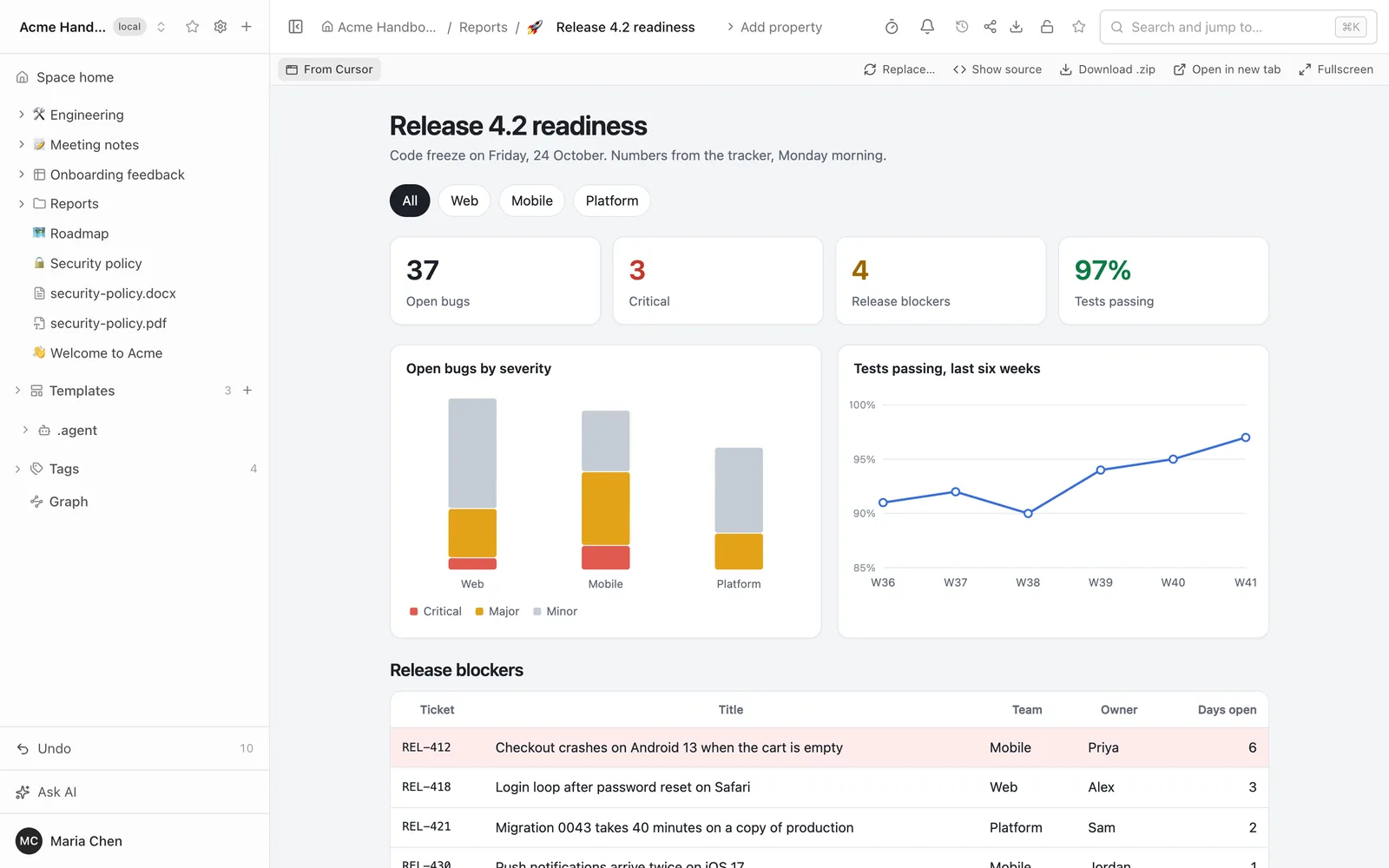
Folio does not run a canvas. Cursor's components exist only inside Cursor, so the agent rebuilt the page: React loaded from a CDN, the layout written in plain HTML and CSS, and the charts redrawn as SVG. It is the same page in structure, numbers and behaviour, and not the same pixels. The colors, spacing and chart style are the agent's, not Cursor's.
We opened it in Chrome and tried it. The numbers matched the canvas: 37 open bugs, 3 critical, 4 blockers, 97% of tests passing. The Mobile button changed the cards to 13, 2 and 2 and left two rows in the table. The checklist boxes ticked, and nothing in the browser console complained. Above the page Folio shows the label From Cursor and the same buttons as for any artifact: Replace, Show source, Download as a ZIP archive, Open in a new tab and Full screen.
It remembers where you were
We chose Mobile, ticked two boxes and reloaded the page. It opened on Mobile with the same two boxes ticked. The agent kept that state in the browser's local storage, which Folio saves for each reader: in its database for a signed-in person, in the browser for a guest of a share link. A second reader starts from the defaults and sees only their own clicks.
This is not the state of the canvas file. Cursor keeps it in a data file on your disk and Folio never reads that file, so a published page starts from the defaults written in its code.
The canvas file comes along
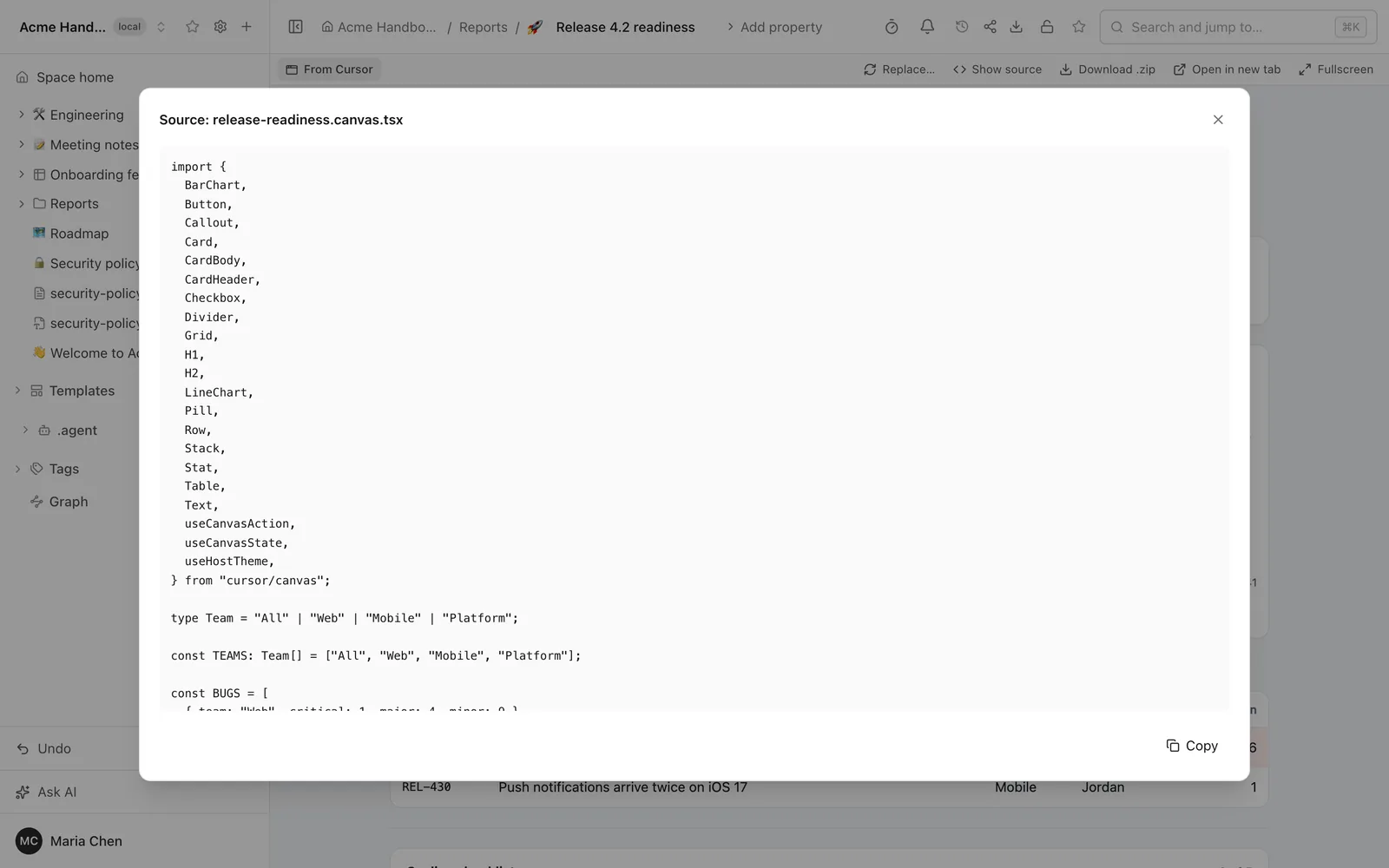
In Git the page is a folder named after it and ending in .artifact. It holds the page, a small manifest that says the type is canvas and the origin is Cursor, and the canvas file. A developer who pulls the repository sees the original next to the HTML, and Show source lets anyone in the wiki read it. The Claude artifacts post has the rest of what an artifact is in Folio: where it sits in the tree, search, rights, the sandbox.
One thing we found by comparing the copy with the original: the agent retyped the file instead of copying it, and one character came out wrong, a stray brace in a line of the number cards. Folio keeps what it is sent and does not check it, so the stored copy would not compile in Cursor as it is. If the original matters, compare the two before you rely on the copy.
The button that has no one to call
A canvas can have buttons that call back into Cursor, such as one that opens a new chat with a question. Inside the wiki there is no Cursor to call. The agent noticed and made the button show the question it would have asked. Nothing in a published page can start an agent, and Folio does not offer a way to.
Not by link
Folio does not download a Cursor share link, and says so: ask the agent to publish through MCP, or paste the HTML of the page into the import dialog (+ in the sidebar, then Artifact...). Importing by hand takes an HTML, ZIP, SVG or Markdown file, and the integrations page has the steps to connect Cursor.
Where it stops
- The agent does the translation, and it is not exact. Folio shows finished pages; it has no TSX runtime. The look of Cursor's charts and components is approximated, and a long or odd canvas may come out with differences. Open the page and check it against the canvas.
- Nothing calls back. Actions that open a chat or run an agent from the canvas do not work in the wiki. A page that expects calls to Claude, your own services or connectors is marked as working partially.
- Published pages are snapshots. The wiki page does not follow the canvas file. To update it, ask the agent again; with the same page it replaces the content and keeps the link, the place in the tree, the title and the properties.
- Casual prompts leave choices to the agent. It picked the space and the folder, and in the first try it started without the Folio tools in its list and went exploring. Name the space, and check that Cursor shows the Folio server as ready.
- The same limits as any artifact. Search finds the written text of the page, not what a script draws later; a bundle is limited to 500 files and 50 MB; and the page runs in a sandboxed frame that loads scripts only from a short list of CDNs.
The full list of limits is in LIMITATIONS.
Try it
To run Folio yourself, start with the install guide, connect Cursor as the integrations page describes, and ask for your canvas to be published. The short version is in the Artifacts section of the README on GitHub. The code is under the MIT license.
See it in a running Folio
Open the live demo and click through a real Folio instance, or install it and move one space over. Folio is open source and stores everything in Git.
Related
More from the blog
- Confluence MCP, Notion MCP and a wiki that is its own MCP server
- Export Confluence to Markdown and keep it in Git
- Mermaid diagrams in a team wiki: keep them as code
- See how your team's knowledge connects: graph, Canvas and Bases in Folio 0.4
- Open an Obsidian vault as a team wiki, without changing a file
- Publish a wiki space as a public website, and let visitors ask it questions
- Docs-as-code without the IDE: edit your repository's docs in a browser
- New hires ask the wiki, and the wiki learns what it lacks
- Folio boards: built on Excalidraw, made for teams