New hires ask the wiki, and the wiki learns what it lacks
· Sergii Kravtsov · Folio
A new hire can ask the wiki instead of a colleague, and that is only worth doing if two things hold: every answer names the page it came from, and every question the pages cannot answer is recorded for the person who owns them. Folio AI, the assistant built into Folio, is set up to do both. This post follows one onboarding loop, then explains how it works inside, who can see what, and where it stops.
The scenario is a made-up company, Acme. Jamie Park is a new salesperson who asks whether she can agree to 25% off an annual plan. The assistant says no, names the person who approves it, and links the page that says so, so nobody is interrupted and Jamie can check the claim in one click. The people and pages are demo data, and we have not measured how much faster a real person ramps up this way, so this post is about the mechanism and not about a result.
The loop in one picture
Onboarding with an assistant is a loop and not a chat window. The new hire asks, the assistant answers from pages or admits that it cannot, the gap is recorded, an admin closes it, and the next person who asks gets the answer. The rest of the post follows the numbers in this picture.
What the new hire sees
Jamie is on her first day in the Sales space at Acme. She has the editor role in that space only, so the assistant can read only what she could open herself. She opens the Folio AI panel in Ask mode, which is read-only, and asks whether she can agree to 25% off an annual plan. The answer is no, with the reason: that band needs the VP Sales, Elena Brandt, and only for annual prepay. Under the answer is a Sources line linking to the Pricing and discounts page, and one click opens that page next to the panel.
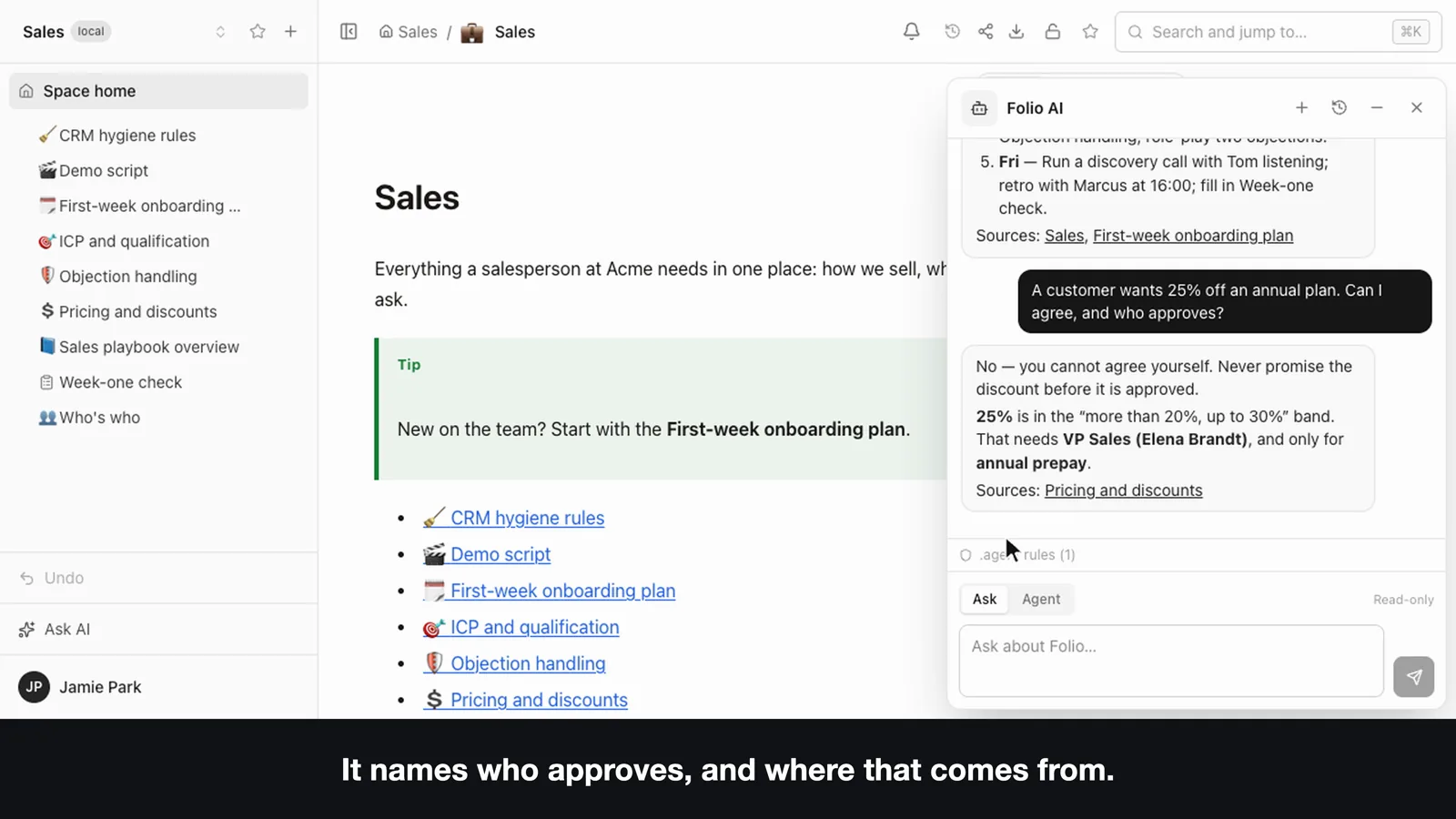
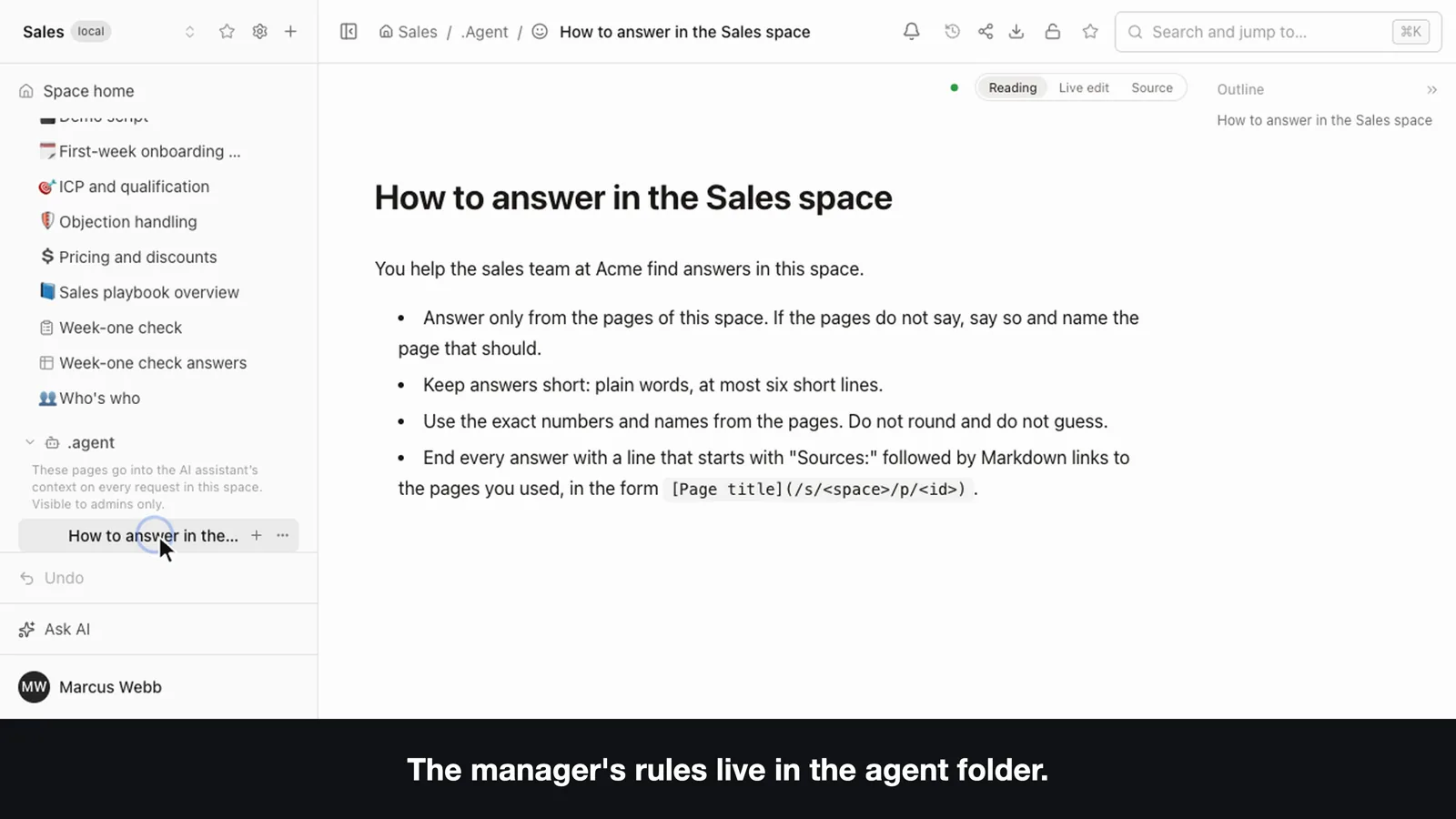
The Sources line is a decision of the space and not a property of the assistant. The system prompt asks for a link to the page behind every factual statement, and the tidy line at the end comes from a short rule page in the space's .agent folder that the manager can change. In the video the manager, Marcus Webb, adds one line asking for a "Next step" before the sources, and the next answer follows it. Pages in .agent go into every assistant run in that space, up to about 60,000 characters, and only space admins can open or edit them. They are ordinary pages, so Git remembers who changed a rule and when.
Where the answers come from
Four things decide whether the answers can be trusted: where the content lives, how the assistant finds it, what it is allowed to do, and how a link ends up in the answer.
Pages are files in Git
Every page is a Markdown file in your Git repository. PostgreSQL holds the index, the access rules and the live-editing state, not the content. The assistant reads the same pages that people edit, so there is no second copy of the wiki to keep in sync.
The assistant is a client of Folio's own tools
Each run builds an in-process MCP server for the signed-in user and connects the assistant to it. These are the same tools an outside agent gets at the MCP endpoint, with the same checks, so the assistant has the rights of the person who asked and no others. In Ask mode the write tools are removed before the model sees the list, and the connection is read-scoped as well, so a write would be refused on the server even if the model asked for one. The run is also given no shell, file or network tools, because the agent process runs without an OS sandbox and a file tool could read the Git repositories of spaces the user cannot open. Two built-in tools are added to the Folio ones: one that returns the working instructions for a family of tools, and the one that records unanswered questions.
Finding the page
The assistant searches with Folio's full-text search, which is PostgreSQL text search with accents folded plus similarity on titles, filtered in SQL to the pages the person may read. It then reads a page by its id and answers from what it read. There are no embeddings and no vector store. The practical consequence is that a page written in other words than the question is found less reliably than a semantic index would find it, although the assistant can retry with different words.
Why the link is there
The prompt asks for a link to the page behind each factual statement, built from the space and the page id that the tools returned and never invented. The panel renders these as links that open the page without closing the conversation. The link is written by the model, so it is a pointer to check and not a proof, and the check is the click. The prompt also tells the model that page text is data and not instructions, which limits what a hostile sentence on a page can do, but it is a rule given to a model and not a sandbox.
When the wiki has no answer
In the second video Jamie is in a support space and asks what to tell a customer on an annual plan who wants a refund after 40 days. The pages cover monthly plans only, and the assistant says so instead of guessing, adding that the monthly rule should not be treated as the answer. This is the moment the setup exists for, and three signals come out of it without anyone filling in a report.
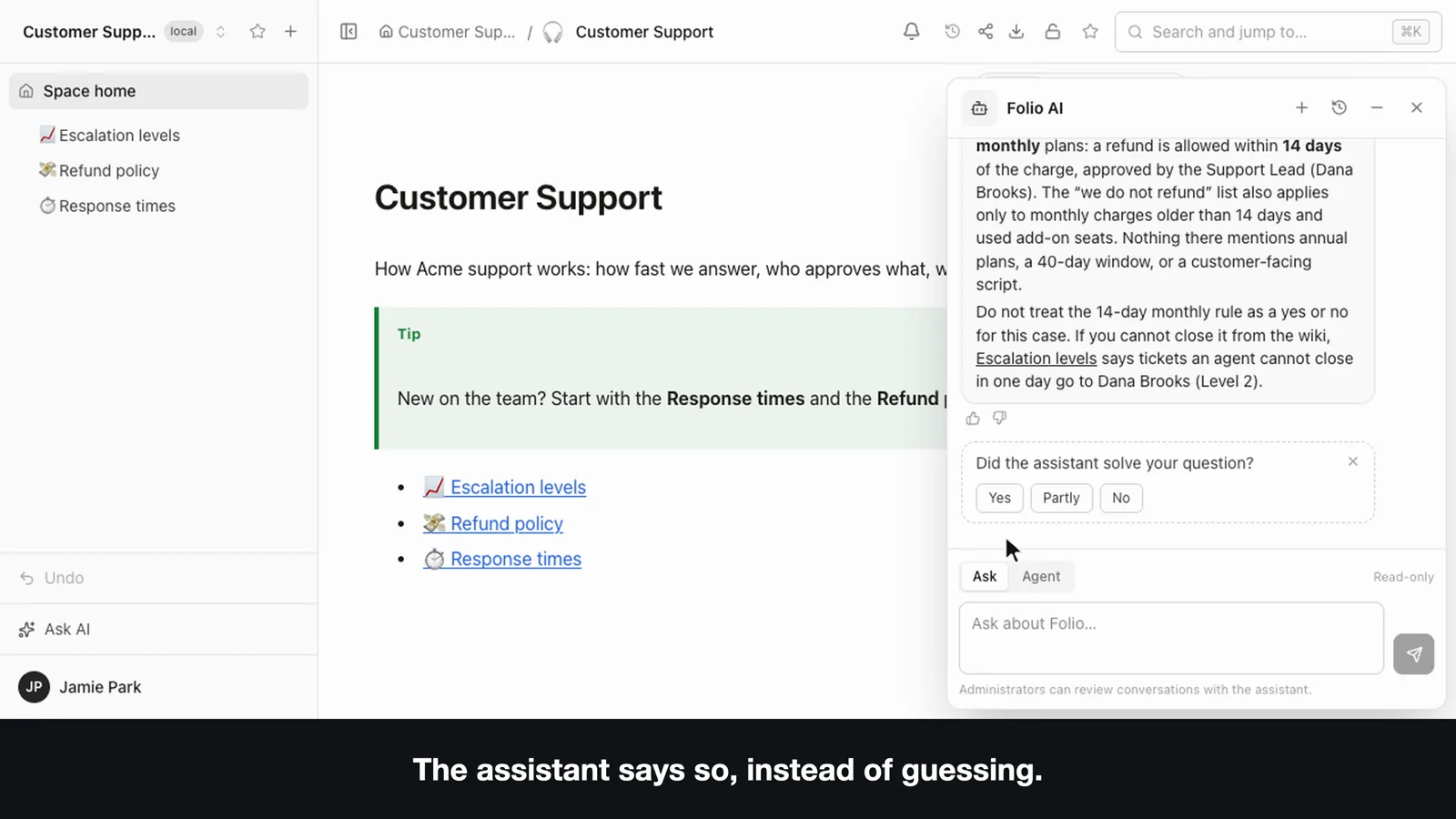
- A rating. Thumbs up or down on each saved answer, one per answer, and it can be changed.
- A survey. After every third answer the panel asks whether the assistant solved the question: Yes, Partly, No or Not now, with an optional comment.
- A report from the assistant itself. Folio gives the assistant a built-in tool that it calls when the pages do not contain the answer or when it had to infer one. It passes the question restated so that it reads on its own, a reason (no answer or not sure), and one or two sentences on what is missing, with links to the pages it had read in that run. It reports each question once, at most three per run, never changes any data and does not mention the report to the user.
All three land in the same PostgreSQL database as the conversation. An outside agent connected over MCP does not get the reporting tool, so only the built-in assistant produces this list.
Who sees the analytics
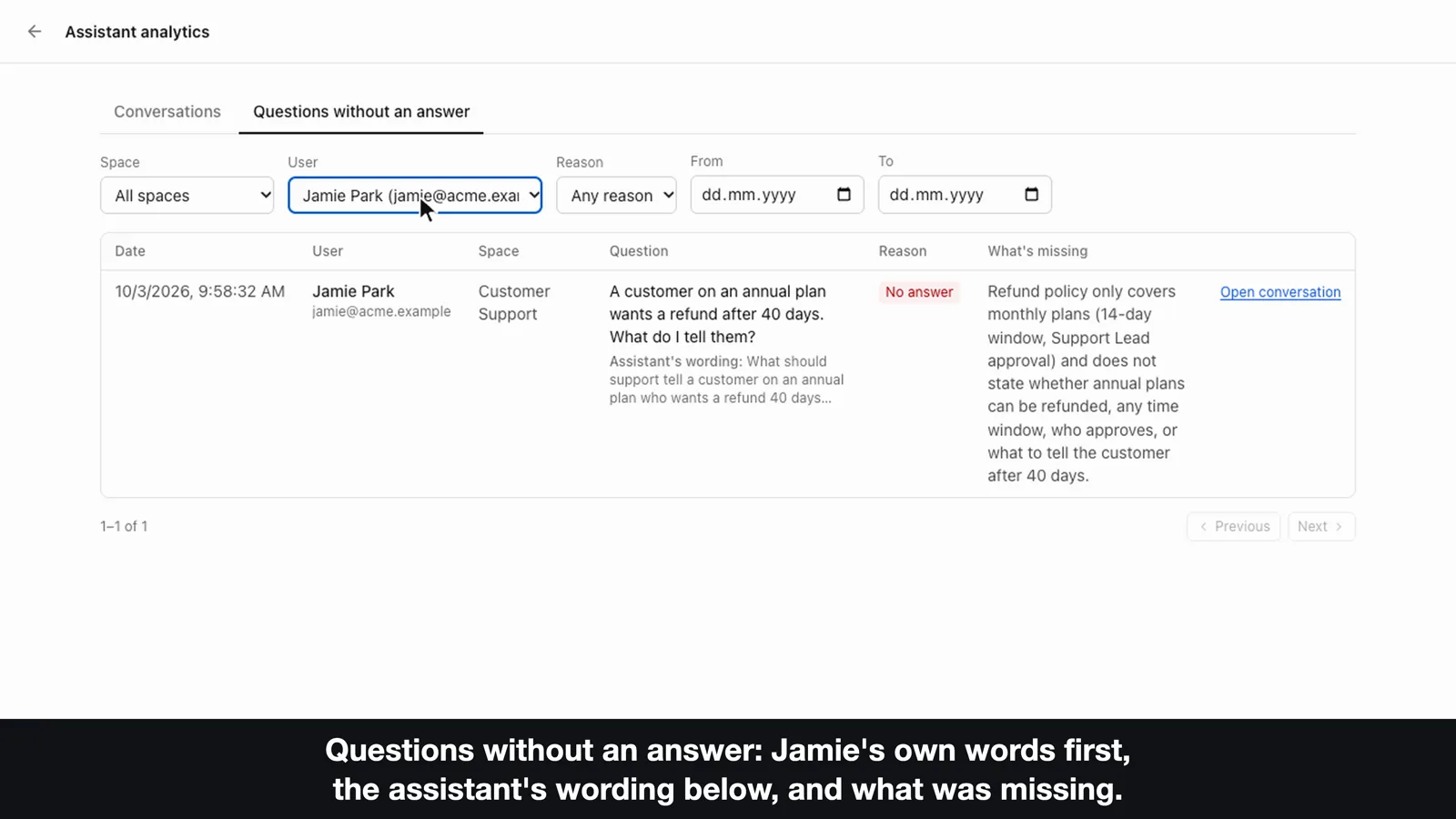
The page is Assistant analytics in the account menu. It has a Conversations tab with ratings and survey results per conversation, and a Questions without an answer tab that shows the person's own words first, the assistant's wording under them and what was missing, both filterable by space, user and date. An instance admin sees every space. A space admin sees the same page limited to the spaces they administer and only the messages of runs in those spaces, which the server enforces in its database queries and not by filtering afterwards. Everyone else does not get the page, and a personal access token is refused there.
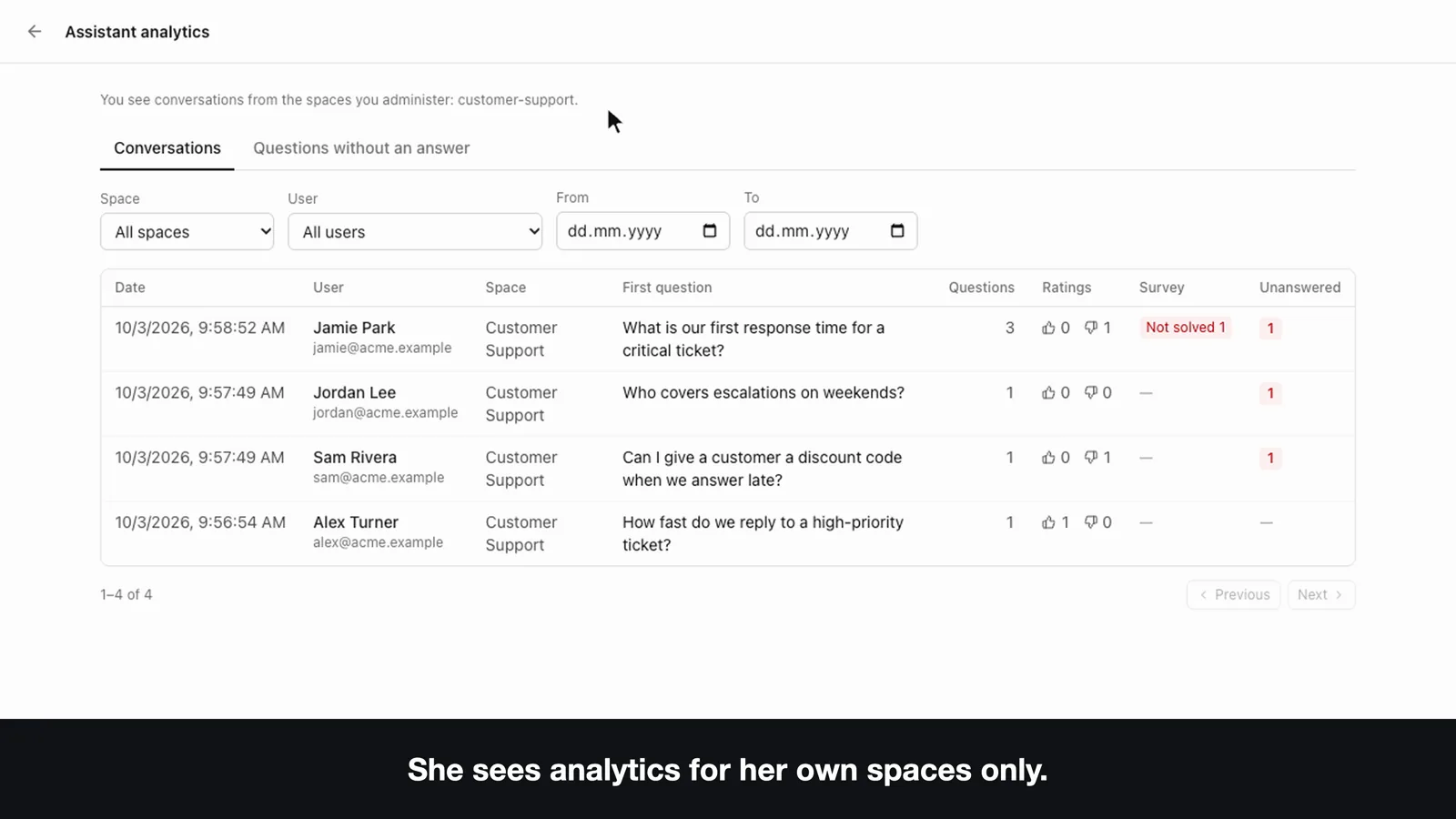
Reading someone's conversation is a privacy decision, so Folio makes it visible. Opening a conversation writes an entry to the audit log, the conversation page shows who opened it and when, and the assistant panel tells every user that administrators can review conversations with the assistant.
Closing the loop
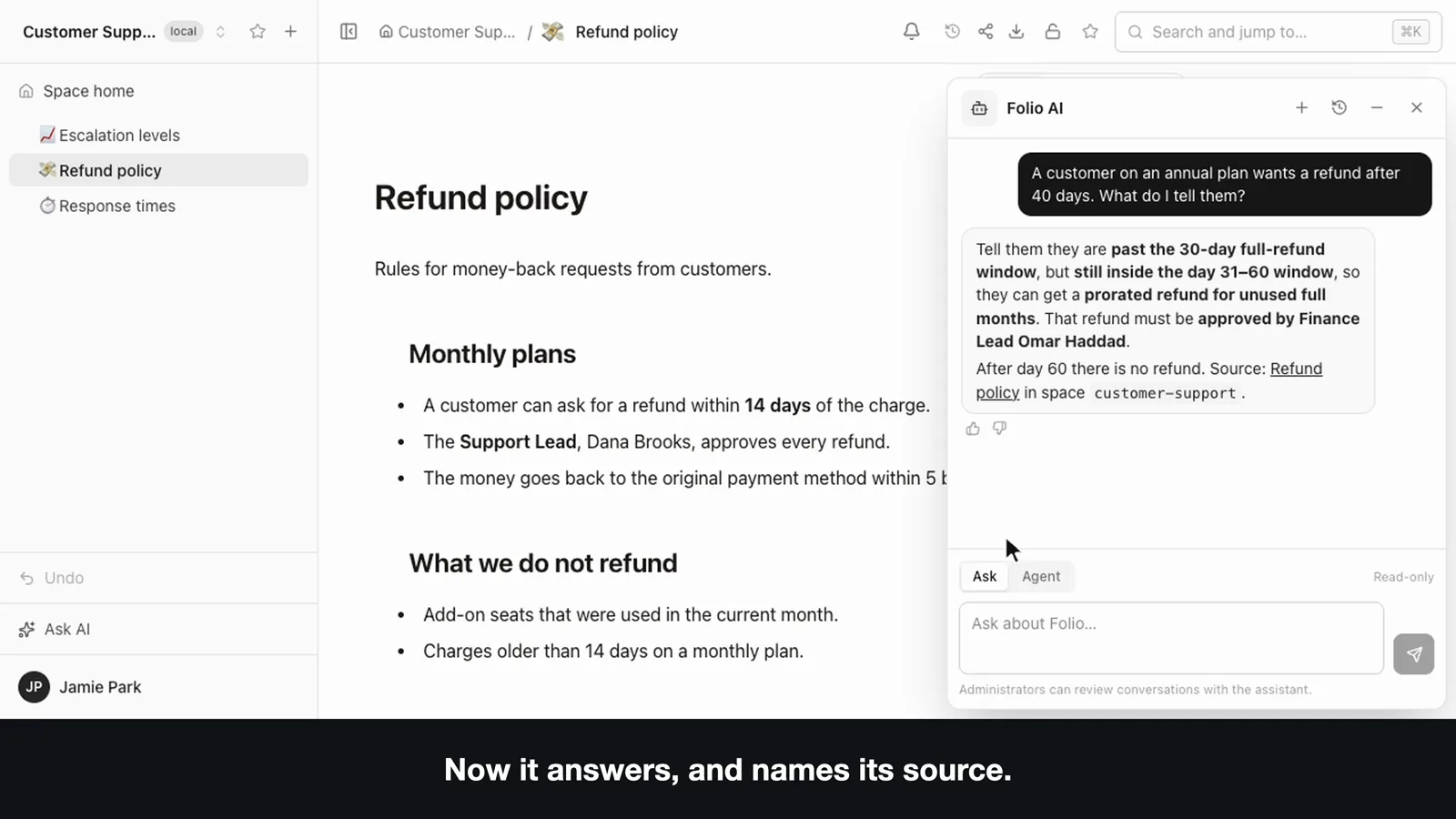
Dana, the space admin, reads Jamie's question, opens the Refund policy page and writes the missing section: refunds on annual plans, the time windows and who approves them. Jamie asks again in a new conversation and the answer now gives the rule, names the Finance Lead and links the Refund policy page. Nothing rewrote the wiki on its own. The analytics show where the pages fall short and a person with edit rights closes the gap, which is the division we want, because the owner of a page is the one who knows what is true.
A starter package for this setup, with the rule pages and a week-one form, is in the repository. It is a description and starter pages and not a one-click template.
What stays on your server
Folio is self-hosted. The pages are in your Git repository, and the index, access rules, conversations, ratings, survey answers and unanswered questions are in your PostgreSQL; none of it is sent to us. What does leave is the assistant's own traffic: the built-in assistant runs on Cursor, so the pages it reads and the conversation go to Cursor, which is the only provider for now. It needs a Cursor key, either a personal one in account settings or one shared key set by whoever runs the server. Without a key the rest of Folio, including the wiki, search and MCP for your own agents, works as usual.
Where it stops
- A Cursor key is required, and the pages the assistant reads go to Cursor. There is no other provider yet.
- Search is keyword-based, with no embeddings, so the assistant is only as good as your page titles and wording. A miss shows up as an unanswered question, which can mean a missing page or a missed search.
- Links are written by the model. Open the source before you act on a discount or a refund.
- The list has blind spots. It holds what the assistant flagged, what people rated down and what the survey caught. A confident wrong answer that nobody rates is not on it.
- Fixing is manual. The analytics do not edit pages or tune the assistant.
- One rule set per space. The .agent folder gives a space one assistant configuration, not several.
- The public demo has the assistant switched off. To see it live you need your own installation and a key; the videos show the same flow.
- The scenario is demo data. Acme and its people are made up.
Try it
To run Folio yourself, start with the install guide. To look around a Folio wiki first, open the public demo, pick Sam on the sign-in screen (the data resets every 24 hours and the assistant is off there). The code is on GitHub under the MIT license.
Earlier write-ups of the same setup, from the business side: DEV Community, Medium and, in Ukrainian, Cases.media.