Publish a Claude artifact to your team wiki: interactive pages that live in Git
· Sergii Kravtsov · Folio
You ask Claude for a sales dashboard, a pricing calculator or a launch checklist, and it builds a small interactive page. It is exactly what the team would like to open next week, and it lives in one chat. Send a screenshot and the filters stop working. Send the chat and nobody can find it. Folio now has a page kind for these pages, the artifact, so the thing the agent built becomes part of the wiki.
Below: what an artifact is in Folio, how an agent publishes one, how to bring one in by hand, what it is stored as, and the limits. Cursor canvases and any other self-contained HTML page work the same way.
A page, not a screenshot
An artifact sits in the page tree next to your notes. It has a title and an icon, it is found by the quick switcher and by search, it can carry properties and tags, and it follows the same access rights as every other page. Move it, copy it, put it in the trash, share it by link or publish it with a public site, as you would a document.
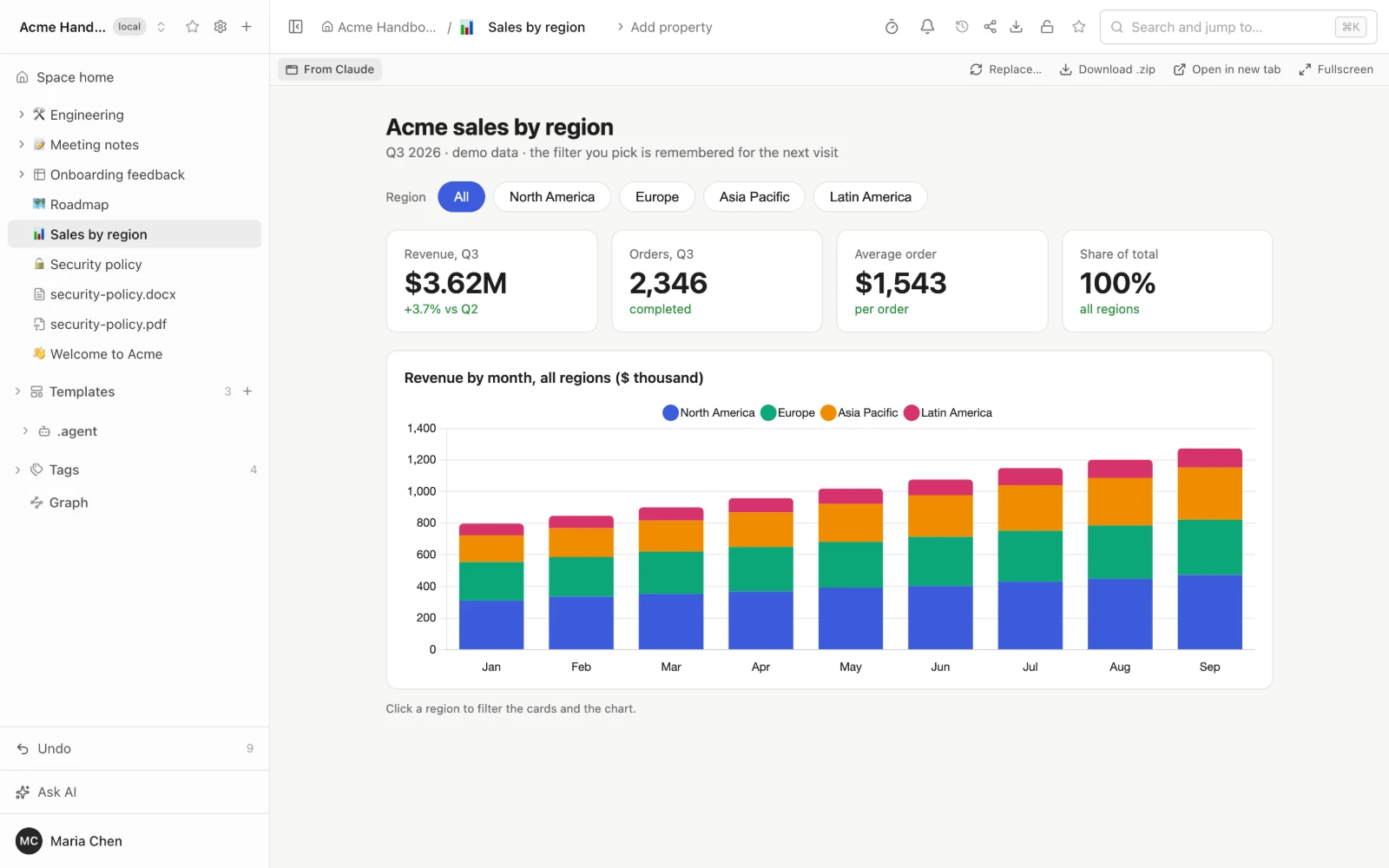
The page is interactive. Filters, tabs, charts, forms and a dark switch work as they did in the chat. Above the page are Replace, Download as a ZIP archive, Open in a new tab and Full screen, and a Show source button lets anyone read what the page is made of.
It remembers where you were
A dashboard that forgets the chosen filter every time you open it is a poor wiki page. Claude artifacts keep small bits of state with a storage interface, and Folio provides the same one, plus the browser's own local storage. Reload the page and it opens on the same region and the same tab.
The state is kept per reader. For a signed-in person it is stored in the Folio database. A guest who opens a share link or a public site keeps theirs in their own browser, so one visitor's clicks never change what another sees. A page can also keep a shared part, which guests only read.
Publish from the agent
Connect Claude or Cursor to your Folio over MCP (the integrations page has the steps), then say it the way you would to a colleague.
publish this dashboard to Folio, in ReportsThe agent calls the publish tool of the Folio MCP server and gets back the new page and its link. Calling it again for the same page replaces the content and keeps the link, the place in the tree, the title and the properties, so "update the dashboard" does not leave a second copy behind. It needs an editor role in the space and a token that can write. The details of the tool are in the MCP guide.
Using Cursor? A canvas goes the same way, and there is a post about what happens to it on the way: what the agent rebuilds, what stays and what does not carry over.
A few things the agent can send besides the page itself: extra files such as data or images, the original source (a Claude React artifact keeps its JSX next to the page), a direct link to a file, or an SVG, Markdown or Mermaid text that Folio wraps into a page. The agent can also read an artifact back, to see what is on the page before it changes it.
Or bring one in by hand
No agent at hand? Press + in the sidebar and choose Artifact.... You can give it a link to an HTML, ZIP, SVG or Markdown file, pick a file from your computer, or paste the HTML. A ZIP can hold several files, and Folio checks the size of what it unpacks. A link is fetched by the server with protection against requests to internal addresses.
Share links of claude.ai and Cursor are the exception. Folio does not download them, and says so with a hint: ask the agent to publish through MCP, or paste the page's HTML. Claude's embed code can also be pasted, but it shows the page in a frame of the original host and does not copy it.
In Git it is a folder
Like everything in Folio, an artifact is stored in the space's Git repository. It is a folder named after the page and ending in .artifact, with the page itself, a small manifest (the type, where it came from, the properties), the original source if there is one, and the extra files. A developer who pulls the repository sees it as an ordinary folder, and the history of the page is the history of the folder.
How it is kept safe
A page made by an agent is code that someone else wrote, so Folio treats it as untrusted. It runs in a sandboxed frame with no access to your session, your cookies or the Folio API, and nothing around it on the page. It can load scripts, styles and fonts only from a short list of CDNs: cdnjs, jsDelivr, unpkg, esm.sh, Tailwind, jQuery and Google Fonts. Requests to other hosts are blocked, so the data has to be in the page or in the files that ship with it. The page's files are served under a signed link that is tied to the page and the reader and expires after twelve hours.
Where it stops
- Folio shows finished pages; it does not build them. There is no JSX or TSX build inside Folio. The agent sends one self-contained HTML page, and a React artifact or a Cursor canvas has to be turned into a page that loads React from a CDN. Components that exist only inside Claude or Cursor do not run until they are rewritten.
- No calls out of the page. A call back to Claude from inside the artifact, a request to your own service, or a connector does not work. A page that expects one is marked as working partially.
- Artifacts are replaced, not edited. There is no editor for the page inside Folio, no comments on it and no versions in the interface. Git keeps the history, and the properties are the only part you edit in place.
- Search sees the written text. It finds an artifact by its title, its properties and the text that is on the page when it loads, not by what a script draws later.
- Size. A bundle is limited to 500 files and 50 MB, a download from a link to 20 MB, and one MCP request to 25 MB.
The full list of limits is in LIMITATIONS.
Try it
To run Folio yourself, start with the install guide, then connect Claude or Cursor to it and publish a page. The short version of all this is in the Artifacts section of the README on GitHub, and the MCP tool is described in the MCP guide. The code is under the MIT license.
See it in a running Folio
Open the live demo and click through a real Folio instance, or install it and move one space over. Folio is open source and stores everything in Git.
Related
More from the blog
- Confluence MCP, Notion MCP and a wiki that is its own MCP server
- Export Confluence to Markdown and keep it in Git
- Mermaid diagrams in a team wiki: keep them as code
- See how your team's knowledge connects: graph, Canvas and Bases in Folio 0.4
- Open an Obsidian vault as a team wiki, without changing a file
- Publish a wiki space as a public website, and let visitors ask it questions
- Docs-as-code without the IDE: edit your repository's docs in a browser
- New hires ask the wiki, and the wiki learns what it lacks
- Folio boards: built on Excalidraw, made for teams