Folio vs. Nimbus
Nimbus and Folio are different kinds of tool that overlap on Git storage, public docs and MCP. Nimbus, a Cloudflare project on GitHub, is a static docs-site generator: developers write MDX in Git, edit it in their own editor and publish a site that also serves Markdown, llms.txt and an optional MCP server to agents. Folio is a server where people who do not write code edit pages together in a browser, under roles, groups and SSO, with boards, data tables, an assistant and 49 MCP tools that read and write. Choose Nimbus for public product docs written by developers, with an OpenAPI reference, hosted as static files anywhere. Choose Folio when a wider team edits, or when internal and public docs belong in one place. The two can also share one repository.
Updated
The workflow difference
In Nimbus, the pages are MDX files under src/content/docs/ in your repository. You edit them in your own editor, the folder layout becomes the routes and the sidebar, and a build turns them into a static site with versions and locales. Nimbus's lint command checks drafts against writing rules (with --fix), its check command validates the project without a build, and drafts need sign-off. The built site serves each page as Markdown plus llms.txt and llms-full.txt, optionally Agent Skills and WebMCP search, and a remote MCP server for search and reading of the published docs when you add a server adapter (Cloudflare, Netlify, Vercel or Node).
In Folio, the pages are Markdown files in a Git repository too, but they live behind a running server. People open them in a browser and edit together in real time; a browser edit becomes a commit after about 90 seconds of quiet, and a push from an IDE returns to the wiki. A space can be published as a read-only website with search, and agents reach the same files through 49 MCP tools that can write as well as read. So the question is less which one stores Markdown in Git, and more who writes the docs and where they are read.
Side by side
Rows marked Plus are where Folio is ahead.
| Area | Folio | Nimbus |
|---|---|---|
| What it is | A server that a team opens in a browser; pages are Markdown files in Git | A static docs-site generator, in the family of Docusaurus, Mintlify and Starlight; built on Astro |
| Where pages live | Markdown, table and board files in a Git repository; PostgreSQL holds the index, rights and live-editing state | MDX files under src/content/docs/ in your Git repository; the folder layout is the routes and the sidebar |
| Who edits and how | PlusAnyone with a role, in a browser: reading, live edit and source modes. Developers can still edit the same files in an IDE | Whoever can edit files in the repository, in their own editor. We found no WYSIWYG or block editor in Nimbus |
| Realtime and review | Real-time editing of documents, tables and whiteboards; history is Git commits with the editor as author | Git workflow (branches, pull requests). We found no real-time collaboration or comments in Nimbus. Its drafts need sign-off |
| Access control | PlusRoles per space, groups, rights per page inherited by child pages, OpenID Connect and SAML 2.0 sign-in, SCIM and an audit log | Not part of Nimbus. Who can change the source is set by your Git host; who can read the published site is set by your hosting. We found no in-app permissions, groups, SSO or audit log |
| Publishing public docs | A space can be set public: read-only site on a path, a subdomain or your own domain, with search, optional downloads and its own robots.txt and sitemap. A page with its own restriction is never published | The main job: a static site you host anywhere, with versions and locales |
| Output for agents | A public website serves llms.txt, llms-full.txt and a Markdown copy of each page. 49 MCP tools with read or write scope over pages, boards, tables, forms, bases and the link graph; a built-in assistant (Ask and Agent) on a Cursor key | Per-page Markdown, llms.txt and llms-full.txt, optional Agent Skills and WebMCP search, and an optional remote MCP server to search and read the published docs (needs a server adapter) |
| Writing checks | A page named writing-rules in the space's .agent folder. "Check against writing rules" has the assistant list each finding with a suggested rewrite (it needs an AI key); the MCP tool check_page_writing_rules gives agents the rules and the page | nimbus-docs lint checks drafts against writing rules, with --fix; nimbus-docs check validates the project without a build |
| Search | Search across the space with operators, tags, properties and saved searches; Ask mode answers from pages you may open | Built-in search, and AI search that shows its sources |
| API reference | None: Folio has a REST API of its own, but it does not render an OpenAPI reference for your product | OpenAPI 3.x reference with a "Try it" panel |
| Content from elsewhere | Confluence import (a page or a tree); an Obsidian vault, a Markdown repository or a Nimbus docs folder (MDX included) connects without changes to its files. No Notion importer | Content loaders for Notion, Google Docs and other git repositories; a component registry |
| Tables, boards, forms | Typed data tables, forms, Excalidraw whiteboards and Mermaid diagrams in the same tree | Not offered as editable objects; whatever MDX components can render |
| Hosting | Needs a long-running server: Docker, PostgreSQL and Redis. No serverless hosting, no hosted version | A build (Node 22.12 or newer) produces static files you can host anywhere, serverless included. Only the optional MCP server needs a server adapter |
| License and price | MIT; you pay for your server and any AI subscription you connect | MIT, free. No hosted tier |
| Maturity | Version 0.4; young, with a small community | Pre-1.0: the API may change between minor versions. About 1.6k GitHub stars and a release roughly every five days in October and November 2026 |
What Folio changes
- Plus for FolioPeople who do not write code can edit docs visually, together and in real time, instead of learning Git, MDX and a build.
- Plus for FolioReal access control: roles, groups, rights per page that child pages inherit, SSO (OpenID Connect or SAML), SCIM and an audit log. A static generator leaves that to your Git host and your hosting.
- Internal and public docs live in one tree: the same space can stay private for a team and be published as a site, and a restricted page is never published.
- Agents can write as well as read: 49 MCP tools over pages, tables, boards and forms, inside the rights of the person who connected them.
- The cost: Folio does not render an OpenAPI reference, has no versions and locales model for a product site, and needs a long-running server with PostgreSQL and Redis. Nimbus builds static files you can host anywhere.
Where Folio is the better choice
Choose Nimbus when the docs are public product documentation written by developers who are happy in an editor and in Git, when you need an OpenAPI reference with a "Try it" panel, versions and locales, and when you want a static site on any host, serverless included. It is MIT and free, and its output is built for agents. Choose Folio when product managers, support, operations or customers' contacts also write the docs and need a visual editor with real-time collaboration, when the same place must hold internal and public docs under roles, groups and SSO, or when boards, data tables and an assistant that writes matter. Weigh maturity on both sides: Nimbus is pre-1.0 and releases about every five days; Folio is at 0.4. If both groups of people write, use both, as described below.
What we took from Nimbus
Nimbus shows what a documentation site owes to agents, and two of its ideas fit Folio without changing what Folio is.
- llms.txt and Markdown for agents on a public website: every Folio public website serves llms.txt, llms-full.txt and a Markdown copy of each page at the same addresses as the HTML. Pages with their own restriction, their child pages, the space's .agent rules and templates are never listed, and their .md address answers 404. A switch in the site settings turns the files off, and they are off while search-engine indexing is off.
- A writing-rules check built on the space's .agent folder: a page named writing-rules in .agent holds the team's style rules, and administrators can start it from a template. Choose "Check against writing rules" in a page header and the assistant, read-only, lists each finding with the rule it breaks, the quoted fragment and a suggested rewrite; "Fix with Agent" hands the findings to Agent mode. It needs the rules page and a connected AI key. Agents over MCP get the rules and the page text from check_page_writing_rules, which changes nothing.
Use both: Folio as a visual MDX editor for a Nimbus repository
The two tools can share one repository. Create a Folio space bound to the folder that holds the Nimbus pages, src/content/docs. In Folio, .mdx files are pages like .md, so every page of the docs shows up in the tree. We opened Nimbus's own demo docs (apps/demo/src/content/docs, 17 .mdx pages) this way and all of them appeared. Connecting changes nothing in the repository except Folio's own dotfile, .<slug>.folio, which Nimbus's **/*.{md,mdx} glob ignores.
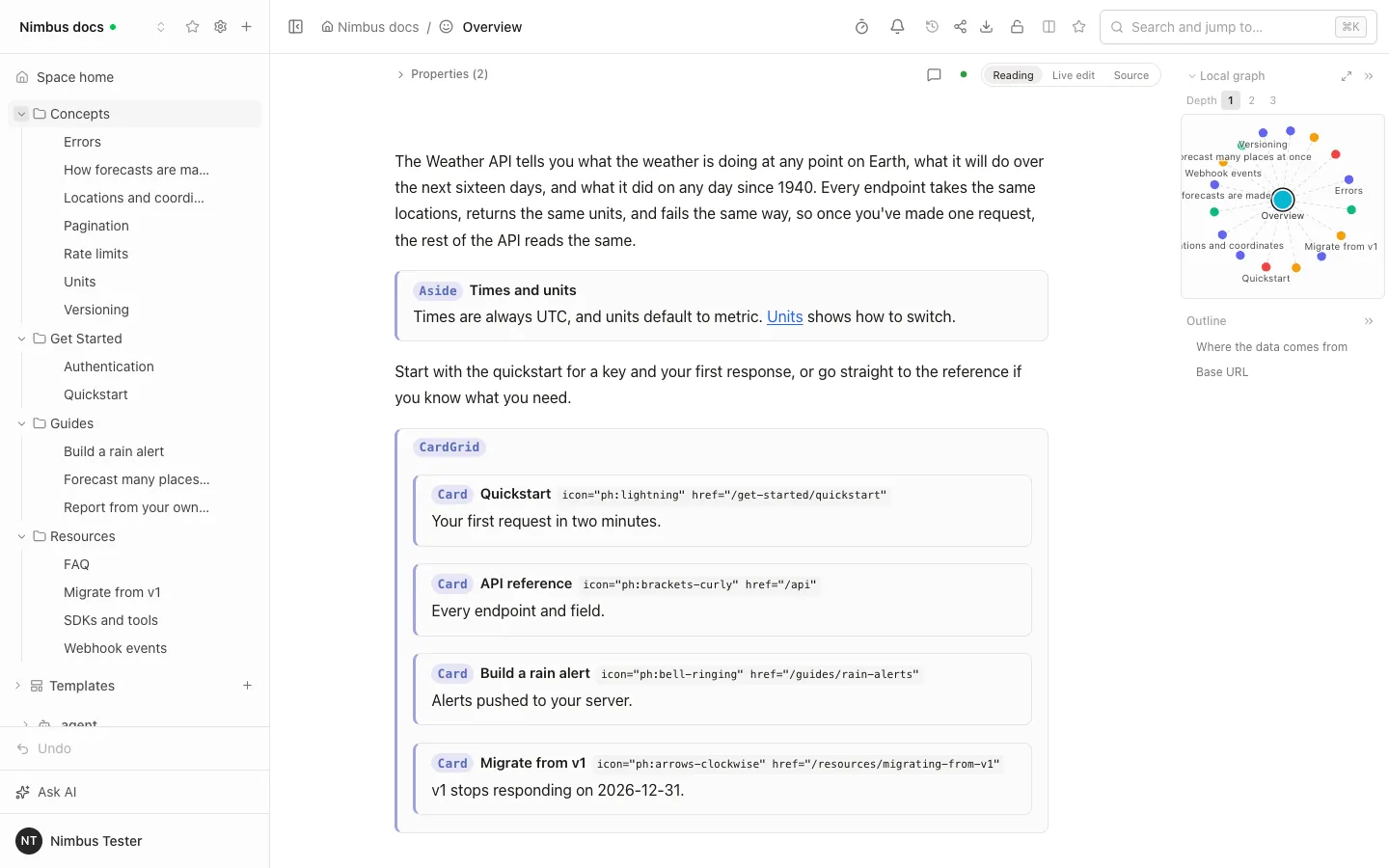
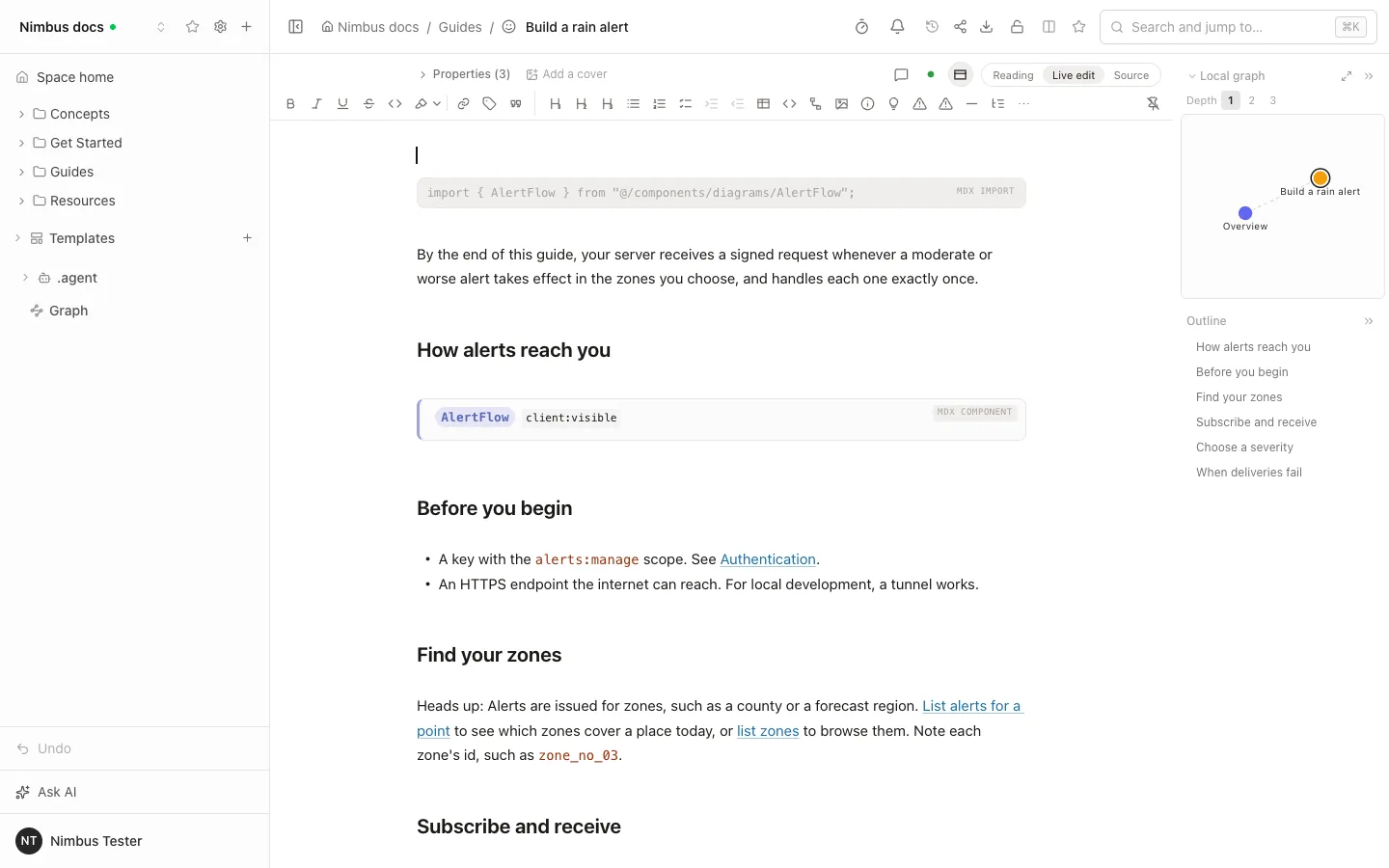
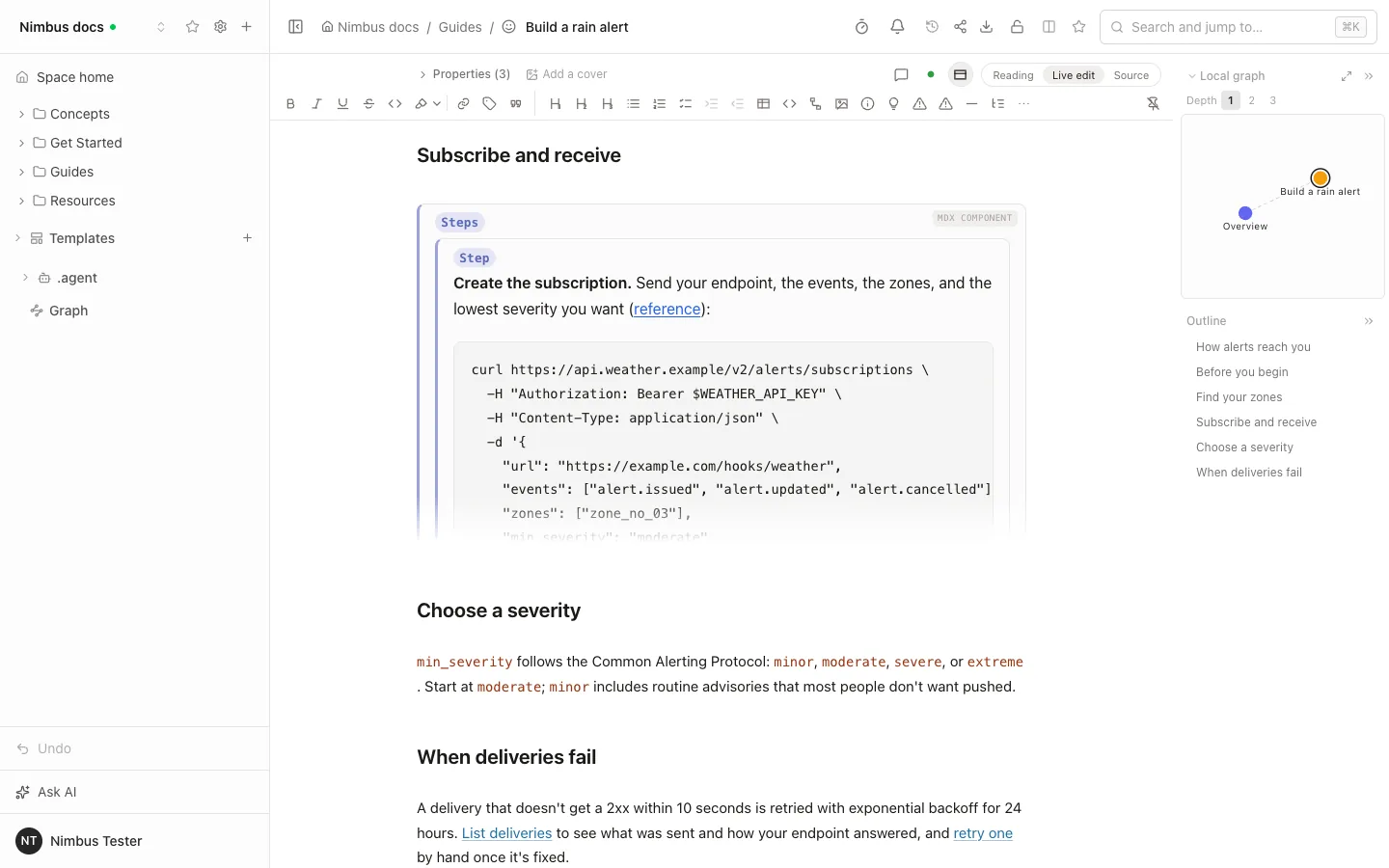
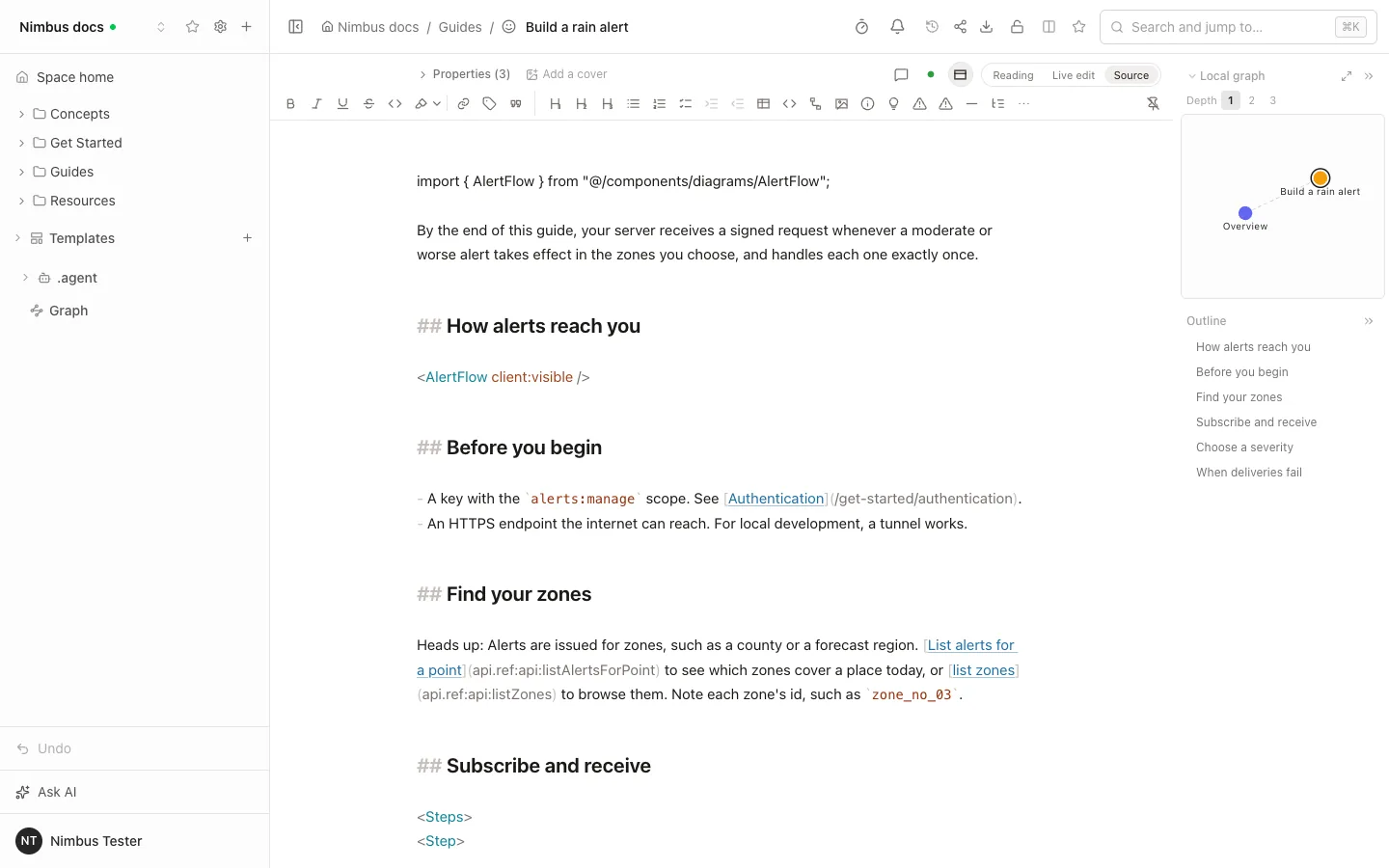
The parts of MDX that are not Markdown survive editing. ESM import and export lines and top-level components (Aside, CardGrid and Card, Steps, Tabs, or your own) are kept byte for byte. In Live edit each one folds into a compact labelled block that opens its source on a click. In Reading, imports are hidden and components show as labelled boxes with their Markdown body. Source mode shows the raw MDX.
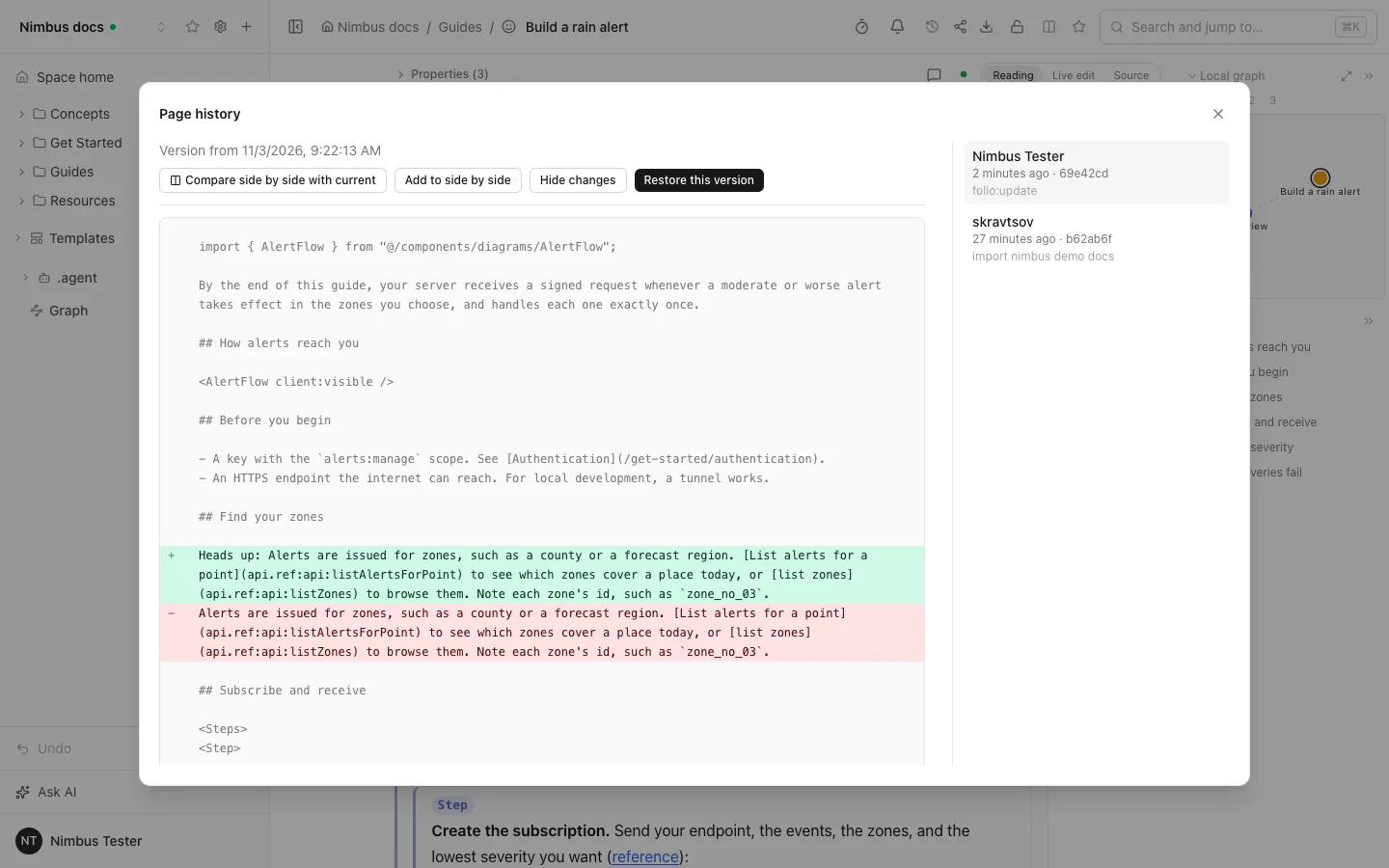
Editing one paragraph in Live edit produces a git commit that changes exactly that paragraph, as the history screenshot below shows. A new page in a folder of .mdx files is created as .mdx with a title: in its front matter, which Nimbus and Starlight require.
The division of work: writers and product managers edit in Folio together, in real time. Developers keep the repository, the components and nimbus-docs lint and check in CI, and the site deploys from the same repository.
Where it stops
- Folio does not run MDX. Components are not drawn as the Nimbus site draws them: no tab switching, no diagrams, and {expressions} stay text. The preview in Folio is not the Nimbus site.
- A component is recognised when a line starts with its capitalised tag and runs to the closing tag. Inline JSX, text after a closing tag on the same line and unclosed components stay paragraph text. Search indexes import lines as ordinary text.
- Folio commits straight to the branch the space follows and opens no pull requests. Point the space at a docs branch; the Nimbus site's own review and CI run after the push.
- nimbus-docs lint and check keep running in your repository; Folio does not run them.
Try it with one real workflow
- Take one section of your docs that a non-developer should be able to change, and look at which components its pages use.
- Create a Folio space bound to that folder, on a docs branch, and edit one page in the browser.
- Run nimbus-docs lint and nimbus-docs check on the branch, then build the site, and confirm the edit shows up.
- Invite one colleague as an editor and one as a viewer, and confirm a page you restricted stays closed to them.
- Give one agent read-only MCP access to the space, and the same question through Nimbus's MCP server, and compare the answers.
Sources (7 links, checked November 3, 2026)
Frequently asked questions
Is Nimbus an alternative to Folio?
Only partly. Nimbus is a static docs-site generator for developer-written MDX; Folio is a server where a team edits Markdown in a browser, with permissions and an assistant. They overlap on Git storage, public docs and MCP, so some teams pick one and some use both.
Does Nimbus have a hosted version, a price or an OpenAPI reference?
Nimbus is MIT-licensed and free to use, and we found no hosted tier; it has an OpenAPI 3.x reference with a "Try it" panel. Folio is MIT too and also has no hosted version, so you run it yourself, and it does not render an OpenAPI reference for your product.
Does Folio publish llms.txt and Markdown for agents?
Yes. A Folio public website serves llms.txt, llms-full.txt and a Markdown copy of each page, an idea we took from Nimbus. Pages with their own restriction are never listed. Folio also has 49 MCP tools for agents that connect to the wiki itself.
Is there a visual editor or CMS for Nimbus docs?
Nimbus itself has none: its pages are MDX files that you edit in your own editor, and we found no WYSIWYG or block editor in it. Folio can serve as one. .mdx files are pages in Folio like .md, so you bind a space to the src/content/docs folder and writers edit the pages in a browser while the files stay the source. Folio is a wiki that opens the folder, not a CMS built into the Nimbus site, and it does not render your components. See the section on using both.
Can non-developers edit MDX without breaking components?
In Folio, yes, within limits. Imports and top-level components such as Aside, Steps or Tabs are kept byte for byte when someone edits a page, and Live edit folds each one into a labelled block. Editing a paragraph changes that paragraph and nothing else in the commit. Folio does not run MDX, so components are shown as labelled blocks and not drawn as your site draws them, and inline JSX stays paragraph text.
Does Folio commit directly or open a pull request?
Directly. Folio commits browser edits straight to the branch the space follows and opens no pull requests. To keep a review step, point the space at a docs branch and merge it as you normally do; your site's own review and CI run after the push.
Other comparisons
Try Folio with one real team wiki.
Clone it, run it, and test the workflow with your own files.